Redshelf Import Process
Redshelf Import Process
To import your Redshlef file to update your E-Books you will need to follow the following steps. This process assumes that the prerequisite steps of exporting your adoption information and sending your list of adoptions to Redshelf have been completed.
Redshelf will send back an email with a link to the file download, the email will look similar to the one below.
On Tue, Jun 8, 2021 at 8:04 AM Alexandra Luna <firstname.lastname@redshelf.com> wrote:
TCS Team,
Here is the file for import:
Representative
Next you will log to TX.27.1 (RedShelf Import) and fill out the fields
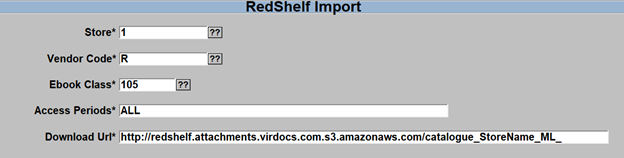
- Enter/Select the store you wish to import for, if you want the import to be active to all stores then enter a ‘*’ in the store field
- Enter/Select the vendor code for Redshelf, this is usually just a ‘R’.
- Enter/Select the correct Ebook Class used in your store.
- Enter in the Access Periods that you want to have available for these ebooks
- Common day count periods are 60, 90, 120, 180, 360,365
- ALL can be used for all data
- P is for Purchase or Lifetime
- Examples:
-
-
- Commas are used to create a list of options
- 90,120,P
- Imports for 90 day, 120 day and Lifetime (Purchase)
- A forward slash is used as an OR option
- 90,120/180, 360/365
- Imports for 90 day, 120 when available or 180 as a fallback option, 360 days or 365 as a fallback option.
- Commas are used to create a list of options
-
- Copy the URL from the email that you received from RedShelf and paste that in to the ‘Download URL’ field
- Select the ‘R’=Run process
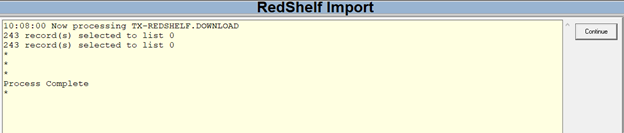
You should see a successful message similar to below.
Once that is done you can run the ‘Batch Print Labels’ (TX.27.2) you will get a prompt to print labels for ‘All’ or ‘Updates Only’ or ‘Exit’
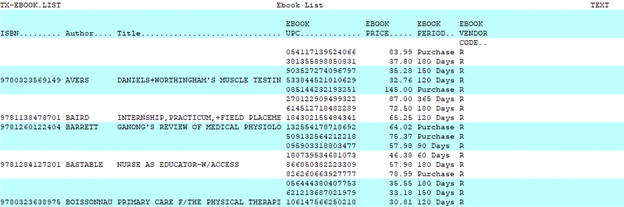
You can also run a report to see a list of all of the Ebooks for a selected store, this will list the Print ISBN, Author, Title Ebook UPC, Ebook Price, and Rental Period. See example below.